


Understand the difference of a website vs web application—from purpose to complexity—to choose the right fit for your project.
“Website” and “web application” are terms often used interchangeably, but they’re not the same thing. Understanding the difference is important—especially when planning a new digital project or choosing the right solution for your business.
While both operate in the browser and may even look similar on the surface, they’re built for different purposes and involve different levels of complexity and interactivity. Knowing where one ends and the other begins helps you define clear goals, choose the right development approach, and invest your budget wisely.
This article breaks down the core differences between websites and web applications, with real-world examples and guidance to help you decide which direction makes the most sense for your needs.
Key Takeaways
Websites focus on delivering content and brand messaging, with limited user interaction.
Web applications are designed for functionality and user engagement—supporting tasks, data handling, and dynamic responses.
The two differ in purpose, interactivity, technical complexity, development approach, and ongoing maintenance needs.
Websites are often faster to launch and easier to maintain, while web apps require deeper planning, custom development, and active support.
Choosing between them depends on your business goals, user needs, and long-term plans—or in many cases, a blend of both may be the right path.
What is a Website?
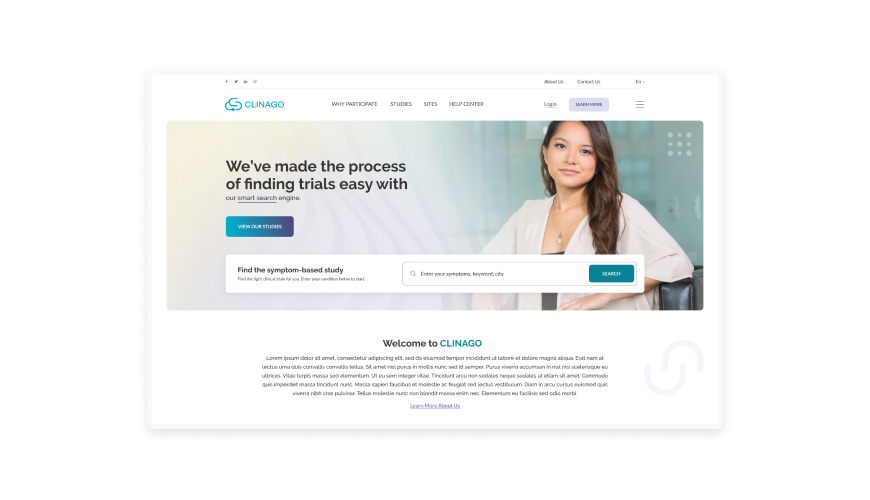
A website is a digital space designed primarily to present information. It can include pages like a homepage, services, about, blog, and contact—typically aimed at informing or attracting visitors rather than interacting with them in a complex way.
Most websites are structured around content delivery: text, images, videos, and forms. While some features like search bars, navigation menus, or contact forms involve light interaction, users are mostly passive participants. They visit, consume content, and leave.
Websites can be built using content management systems (like Craft CMS or WordPress), static site generators, or fully custom solutions—depending on the goals, budget, and scalability needs.
Examples:
Company websites, product landing pages, news portals, blogs, online brochures.
What is a Web Application?

A web application is a digital platform built for interaction. Unlike websites that focus on displaying information, web apps are designed to let users perform tasks—log in, submit data, manage content, track progress, collaborate with others, or make transactions.
They’re dynamic by nature. What you see on the screen often changes based on user actions, permissions, or real-time data. Because of this, web applications require more complex development—typically involving a robust backend, database, APIs, and user authentication.
Web applications are not just visual experiences; they’re tools built to solve problems, automate workflows, or enable functionality online.
Examples:
Online banking platforms, customer portals, reservation systems, dashboards, CRMs, project management tools like Clickup, Trello or Asana.
Here’s How Websites and Web Applications Differ
Websites and web applications may share some surface similarities, but their goals, structure, and user experience are fundamentally different. Here's a breakdown of how they compare across key areas that matter in planning a digital solution.
1. Website vs Web Application on Purpose
A website is primarily intended to inform, promote, or present. It’s designed to provide access to content—whether that’s company information, blog articles, product descriptions, or services. The goal is to attract visitors, build trust, and guide them toward a specific action (like getting in touch or making a purchase), often through a mostly one-way interaction.
A web application is built with the user’s actions in mind. Its purpose is to enable people to do things—submit forms, manage data, collaborate, shop, book, or interact with systems in real time. It’s about functionality, problem-solving, and delivering tools that support specific tasks.
2. Website vs Web Application on Interactivity
Websites typically offer light, one-directional interactivity. Users might click through pages, fill out a contact form, or use a search function—but their input rarely changes the content or experience for others. The structure is generally static, and the user’s role is mostly passive.
In contrast, a web application is designed for deeper user engagement. Actions like signing in, submitting data, or managing tasks directly influence the system. The experience adapts based on the user’s input, role, or activity—making interactivity a core feature, not just a convenience.
3. Website vs Web Application on Complexity
Websites are generally less complex on the backend. They might be built using a content management system (CMS) like Craft or WordPress, with minimal logic beyond displaying content and capturing form submissions. While design and structure can be sophisticated, the technical architecture is usually simpler.
By contrast, a web application involves more technical depth. It requires handling user accounts, managing databases, executing business logic, and often integrating with third-party systems. The complexity scales with functionality—making web applications more demanding in terms of planning, architecture, and testing.
4. Website vs Web Application on Development Process
Building a website typically follows a linear path: design, front-end development, content setup, and launch. The process is well-defined, especially when using a CMS, and often has fewer dependencies or moving parts. It’s usually quicker to complete and easier to estimate in scope.
Developing a web application requires a more layered and iterative approach. It involves mapping user flows, defining system behaviors, architecting databases, building APIs, and conducting multiple rounds of testing. Because of its interactive and functional nature, development is often phased and closely aligned with user feedback and evolving business needs.
| Learn More About Our Development Approach |
|---|
Get a detailed look at how we approach each type of build—from structure and planning to launch and beyond: |
5. Website vs Web Application on Maintenance
A website typically needs routine upkeep—content updates, occasional design refreshes, plugin or CMS maintenance, and security patches. The focus is on keeping the site running smoothly and securely without major changes to how it functions.
Web applications, by nature, require a more active maintenance cycle. Ongoing tasks often include managing user data, releasing feature updates, resolving bugs, scaling infrastructure, and adapting the application to changing user or business needs. Support is continuous and tied closely to the app’s evolving functionality.
When to Choose a Website or a Web Application
Choosing the right solution depends on what your business needs to achieve. Here’s how to evaluate which direction makes more sense:
A website is likely the right fit if:
- Your goal is to inform, promote, or attract.
- You need a place to publish content, explain services, or showcase a brand.
- User interaction is minimal—think contact forms or newsletter signups.
- You’re working with a modest budget or tight timeline.
- Search visibility and content accessibility are top priorities.
A web application is the better choice if:
- Your platform needs to do something—collect data, process transactions, manage users.
- Users log in and interact with personalized features or dashboards.
- Your solution requires real-time updates, automation, or system integrations.
- Security, user roles, and data management are key considerations.
- The project is core to your operations or customer experience.
| See It in Action: Real-World Example |
|---|
| Understanding the difference is one thing. Seeing it applied is where it really clicks. Explore real projects that reflect the kind of solutions we build—whether the goal is clear communication, complex functionality, or both. |
Frequently Asked Questions
1. What’s the main difference between a website and a web application?
A website is primarily designed to deliver content—text, images, and media. Visitors come to read, view, or learn. A web application, on the other hand, is built for interaction. Users log in, perform tasks, submit data, and the system responds based on their input.
2. Can a website include web application features?
Yes, and many modern platforms do. For example, a website might include a login area, a booking system, or a user dashboard—these are web application features built into the broader site. The distinction is less about the visual design and more about the underlying functionality.
3. Is a CMS-based site like WordPress or Craft a website or a web app?
From a user’s perspective, it’s usually a website. But behind the scenes, platforms like Craft CMS offer features common to web applications—such as content management, user permissions, and integrations. In that sense, they’re often a blend of both.
4. Which is more expensive to build: a website or a web application?
Web applications are generally more resource-intensive due to their complexity. They require more planning, backend development, testing, and ongoing support. Websites tend to have a lower cost of entry, especially if the focus is on content and presentation.
5. How do I know which one I need?
Start with your business goals. If you need a digital presence to inform or promote, a website might be enough. If your platform needs to do something—manage users, process data, support workflows—you’re likely looking at a web application.
6. Can my project start as a website and evolve into a web application later?
Absolutely. Many businesses begin with a simple website and scale up as needs grow. A well-planned foundation can be extended with application features over time, especially if scalability is considered from the start.