


Learn how strategic UX research helped transform a high-content, multi-audience industry site into a fast, intuitive, high-converting platform.
For organizations with large, content-heavy websites — especially in complex industries — creating a smooth, user-friendly digital experience can feel like an uphill battle.
Menus become mazes. Content gets buried. Teams spend more time answering support requests than engaging their audience. And yet, these websites are often mission-critical hubs, serving members, stakeholders, and event attendees from around the world.
So, what transforms a bloated, outdated site into a streamlined, high-performing digital platform?
Not just good design. Not just a CMS swap.
The real catalyst is comprehensive UX research.
In this article, we walk you through how our team at Convergine used deep UX research to completely reimagine the website for the Prospectors & Developers Association of Canada (PDAC) — one of the world’s leading mining industry organizations.
We’ll show you how we identified the pain points, validated user needs, and turned insights into a strategic, scalable redesign that now powers PDAC’s digital presence.
| Why UX Research Should Come First |
|---|
| Before you design, build, or launch anything, know what your users actually need. Our complete guide shows why UX research is the smartest investment you can make. |
| Read the UX Research Guide |
The Challenge: Untangling a Complex, Outdated Website
PDAC’s website supports one of the world’s largest mining conventions and provides resources for a global audience of industry professionals, government stakeholders, and members.
The site had several critical issues:
- Outdated Design and CMS: The visual design was old, and the Sitefinity CMS made content updates slow and inflexible.
- Disorganized Navigation: Important information was buried under deep menus. Users struggled to find what they needed.
- Poor Mobile Performance: The site didn’t function well on mobile devices, limiting accessibility during events and on-the-go use.
- Accessibility Compliance Issues: The site did not meet AODA standards, creating legal and usability concerns.
- Inefficient Content Management: Event-related content updates were done manually and across multiple files, increasing the risk of errors and delays.
These problems made the site hard to use, difficult to maintain, and misaligned with PDAC’s operational needs.
UX Research Strategy: A Clear Process with Measurable Outcomes
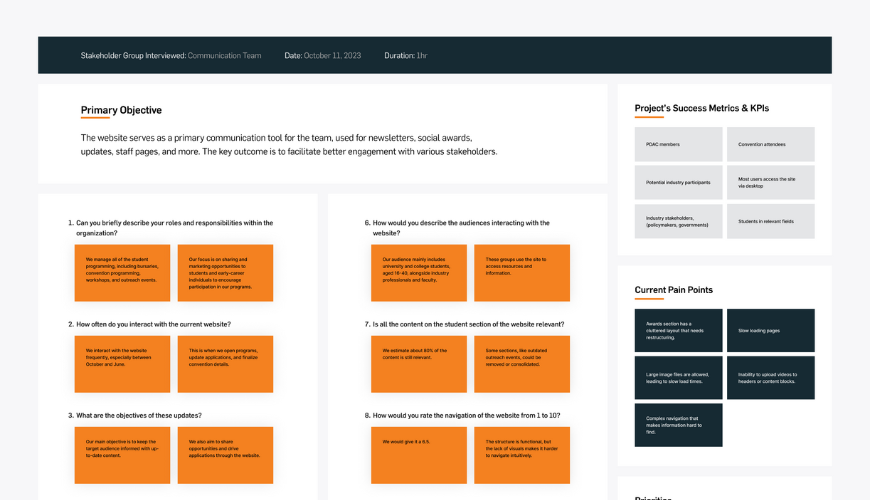
We started the PDAC project with a structured, six-stage UX research process. This allowed us to replace assumptions with real user data and align the website with the needs of its audience and stakeholders.
Our Six-Stage UX Research Process
1. Stakeholder Interviews
We met with key departments at PDAC — including membership, events, policy, and communications. These conversations revealed critical content priorities, internal challenges, and support issues triggered by the site’s structure.
2. Competitive Analysis
We analyzed websites of similar organizations and major event platforms. This showed how competitors streamlined their navigation and emphasized high-value content — something PDAC’s site lacked.
3. Persona Development
Using interview insights and external data, we created representative personas to model key user types. These included members, event attendees, media, and government partners. Each had distinct goals and content expectations.
4. Card Sorting
We used digital card-sorting tools to understand how users naturally organize and label content. This revealed logical groupings that helped us simplify the menu and reduce content friction.
5. Journey Mapping
We mapped common user paths — such as event registration or resource access — to identify where users dropped off, got lost, or encountered unnecessary steps.
6. Information Architecture and Wireframing
Finally, we restructured the content and navigation into a clean, user-tested architecture. Wireframes were developed to validate layout, hierarchy, and functionality before visual design began.
What UX Research Revealed
UX research uncovered key usability issues: users struggled with confusing navigation, buried content, and inconsistent labeling. Important resources were hard to find, driving up support requests. Mobile users faced poor performance, and the site failed to meet accessibility standards. These insights shaped every design and development decision, turning user frustrations into actionable improvements.
| See What Skipping UX Research Actually Costs |
|---|
| Uncover the real risks — from wasted dev time to lost leads — in our detailed breakdown of what happens when research is ignored. |
| Learn More |
Turning Research into Strategy
With clear data in hand, we moved from discovery to execution. Every design decision was tied back to a validated insight from the research phase.
Key Improvements Guided by Research
1. Simplified Navigation
The new structure was based on real user input from card sorting and journey mapping. We reduced menu depth, grouped content logically, and made key actions — like event registration — visible within one or two clicks.
2. Streamlined Information Architecture
Content was reorganized around user goals, not internal departments. High-priority pages were elevated, and rarely used content was consolidated or removed.
3. Craft CMS Integration
We replaced the outdated Sitefinity CMS with Craft CMS. PDAC’s team now has full control over content, with support for bulk updates, multilingual publishing, and structured data entry. This was especially useful for time-sensitive convention updates.
4. Mobile Optimization
We redesigned the site to perform smoothly across all devices. Layouts adapt cleanly, tap targets are accessible, and page loads meet modern speed standards — even under peak traffic.
5. Accessibility Built In
We applied AODA standards across the board — including semantic HTML, proper contrast, keyboard navigation, and screen reader support — to ensure compliance and usability.
| See How It All Came Together |
|---|
| Explore the full PDAC website redesign — from UX insights to infrastructure improvements. See what changed and why it worked. |
| Read the Full Case Study |
Results: A Site That Works for Everyone
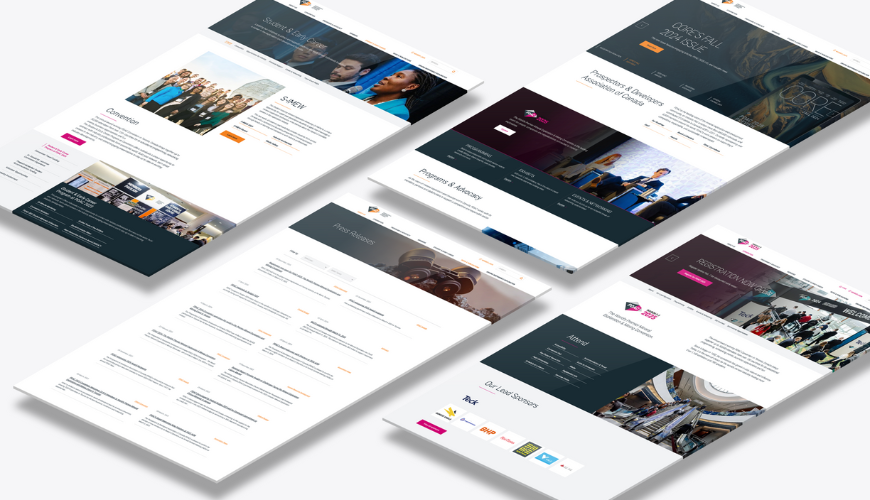
The redesigned PDAC website launched ahead of the 2025 convention with clear improvements in usability, performance, and efficiency. Navigation is simpler, mobile performance is strong, and load times are faster—even during high-traffic events. With Craft CMS, the team can easily manage content, while meeting AODA standards ensures accessibility. Most importantly, user engagement is up, thanks to a cleaner, more intuitive experience—all driven by real UX research.
What Other Organizations Can Learn
The PDAC project offers clear lessons for any business or association managing a large, content-rich website — especially in regulated or complex industries.
Key Takeaways from the PDAC Redesign
1. Start with UX Research
Every improvement in the PDAC site was made possible by research. Without it, decisions would have been based on guesswork and internal assumptions.
2. Choose the Right CMS
Craft CMS gave PDAC the control and flexibility it needed. For organizations managing events, publications, or multi-role audiences, the right CMS streamlines updates and reduces support issues.
3. Structure Around User Tasks, Not Internal Teams
One of the biggest shifts was moving from a department-centered structure to a user-centered one. The site now reflects how people search, read, and act — not how teams are organized.
4. Design for Real Conditions
Whether it’s mobile use at a live event or accessibility requirements across public organizations, good design accounts for the real environments in which users engage.
Final Thoughts: UX Research Is the Difference
When your audience spans industries, professions, and technical abilities — assumptions don’t work. PDAC’s transformation proves that investing in UX research changes outcomes. It doesn’t just fix a website. It clears a path for the people using it, every day.
If your current site isn’t working the way it should — start where it matters. With the research.
| Start With a Smarter First Step |
|---|
| Before investing in design or development, get clear on what’s working—and what’s not. Our free website audit shows where users struggle, where performance breaks down, and how to fix it. |
| Request Your Free Website Audit |